
Checklist
The 45-minute Google Business Profile tune-up
7 min read · Reviewed September 2026
Contents
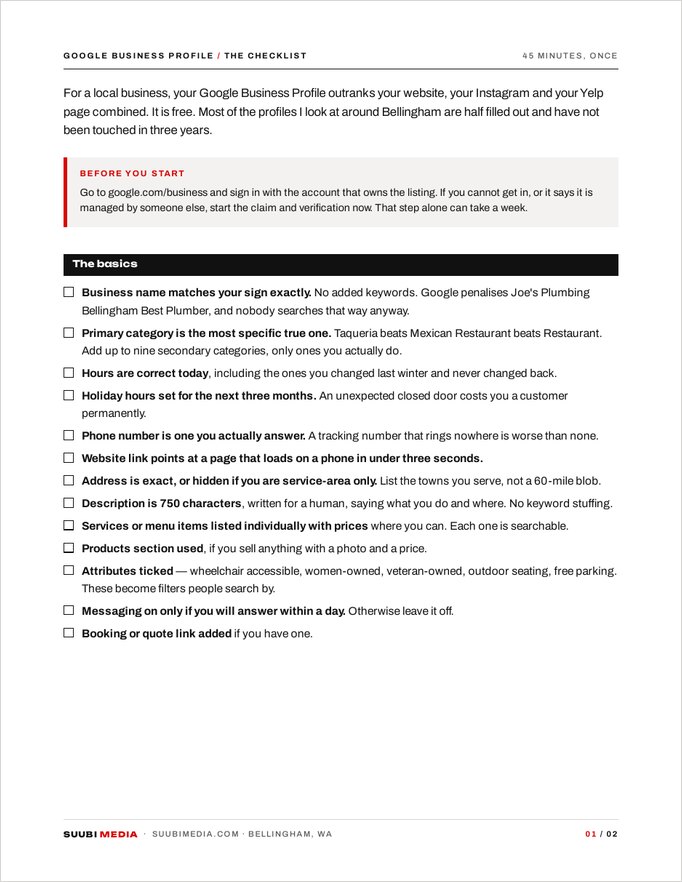
If you only ever do one thing from this page, do this one. For a local business, your Google Business Profile outranks your website, your Instagram and your Yelp page combined. It is the box that shows up on the right side of the search results with your hours and your photos, and it is free. Most of the profiles I look at in Bellingham are half filled out and have not been touched in three years.
Before you start
Go to google.com/business and sign in with the account that owns the listing. If you cannot get in, or the listing says it is managed by someone else, claim it now and start the verification. That step alone can take a week, so begin it before you read further.
The checklist
0 / 13 done
Tick as you go. Your progress is kept in this browser only, so you can close the tab and come back to it.
Photos, which is where almost everyone loses
Google reports that profiles with photos get meaningfully more clicks for directions and calls than profiles without. What nobody tells you is that the photos most businesses upload are worse than nothing: dark phone shots of an empty room, a blurry logo, a screenshot of a flyer.
- Set your logo and a cover photo. The cover is the wide one at the top; make it the most flattering true image of your place.
- Upload at least ten interior and exterior photos taken in daylight. Exterior shots should show what someone sees when they pull up, so they know they found it.
- Add faces. Photos with a real person working outperform empty rooms every time.
- Delete anything blurry, dark, or from a version of the business that no longer exists.
- Add three new photos a month. Recency is a ranking signal and a trust signal.
Reviews, handled properly
- Get the short review link from your dashboard and save it in your phone notes. Send it by text the same day, while the person is still happy.
- Ask in person first, then send the link. A cold link gets ignored; a link after I would really appreciate it does not.
- Reply to every review, good and bad, within a week. Replies are public and future customers read them.
- Answer a bad review once, calmly, with a fact and an offer to fix it. Never argue twice. You are writing for the person reading it six months from now, not the person who wrote it.
- Never buy reviews. Google removes them and it can take the whole listing down with it.
The part almost nobody uses
Google Posts. They sit under your profile and let you publish a short update with a photo. Post once a week: a special, an event, a new arrival, a photo from a job. It takes four minutes and it keeps the profile looking alive to both Google and the person deciding between you and the shop down the road.
Redo this whole checklist every six months. Put it in your calendar for the first Monday of March and September.
Take it with you
Profile cleanup with a fresh set of photos is a common add-on to a shoot.